Transform Gestures into Voice with Webcam‑Powered Assistive Communication
Intro to AAC
Augmentative and Alternative Communication (AAC) empowers individuals with complex communication needs — such as those living with autism, cerebral palsy, ALS, multiple sclerosis, and related conditions — to express themselves more freely. Today’s market offers a wide array of AAC solutions, ranging from smartphone apps to custom‑designed hardware devices. Many of these apps present a language system where each button corresponds to whole words or phrases, organized by part of speech and optimized for frequency, allowing users to navigate via touch, eye‑tracking, head‑tracking, or specialized switches that translate subtle body movements into digital signals.

LAMP Words for Life – a leading AAC app that transforms simple button‑press sequences into fluent words and phrases, streamlining communication.
Our project pushes this paradigm forward by converting nuanced gestures captured with an off‑the‑shelf webcam into a sophisticated, software‑driven language interface — essentially a sign‑language‑like system that adapts to each user’s unique abilities. We combined eye‑tracking, head‑tracking, and simple gesture detection with modern optimizations such as phonetic spelling and state‑of‑the‑art text embeddings drawn from recent advances in AI and machine learning. The resulting system comprises three core components: a gesture‑based keyboard driven by eye and head movements, an innovative phonetic keyboard that streamlines spelling, and a bespoke PyTorch model delivering high‑performance tracking using ordinary hardware. Our north‑star vision is to expand beyond webcam‑captured gestures, eventually supporting richer body‑movement inputs via custom hardware tailored to individual patients’ needs.
In the following sections you’ll see sketches for a number of novel communication apps that we’ve been designing – including a simple spelling keyboard and an experimental phonetic keyboard.
Prototype: Basic Spelling with Gestures
Our initial efforts involved building a prototype of a keyboard app that tracks live head and eye position, captures face and body gestures, and then performs basic spelling functions – all using only a common webcam. While it is a far cry from a fully fledged communication solution, our prototype proves that the overall concept and technology is viable.

An early design for the spelling keyboard controlled via webcam. Letters are arranged in alphabetical order and triggered with gestures like shrugging, winking, smiling, and puckering.
The architecture and design is relatively simple:
- A common, mid-tier webcam is utilized to capture a stream of the user’s head and shoulders.
- A custom-built PyTorch model processes the images and infers a number of useful signals, including common gestures and the position and orientation of the head and eyes.
- The head and eye signals are combined to estimate a gaze location on the screen within an acceptable error tolerance.
- Gestures are utilized to trigger discrete events (e.g. button selections).
- Taken together, the gaze location and gesture events permit the user to navigate a specially designed application without ever needing to use their hands or voice.
Although we could have used one of the many high‑accuracy eye‑tracking modules on the market to estimate gaze location, we wanted a solution that was inexpensive and easy to obtain — so we turned to video streams from a standard webcam. As expected, eye‑orientation accuracy can suffer considerably depending on resolution, lighting, and head position. However, when this data is combined with information about head position and orientation, the resulting gaze estimation becomes quite robust — robust enough to reliably hit reasonably sized targets on the screen.
Not only are webcams cheap and easily obtained, but as general-purpose tools they can be applied in a much wider variety of practical ways than a special-purpose eye tracker. Gesture recognition is a prime example. The same video stream that powers the gaze computation can also be processed to generate gesture signals like shrugging, head tilting, smiling, puckering, winking, and others. This one simple tool is all we need to produce a wide enough variety of signals (both continuous and discrete) to navigate a simple computer system.
Spelling a simple sentence using only gaze and gestures. We use gaze direction to determine location on the screen, and gestures to make selections.
The short video above demonstrates all of these core components. In the video, I use head and eye movement to hover over different groupings of letters on the screen. Then I perform one of five gestures to select a specific letter in the group. Note that gestures are mirrored across all groups — e.g., the same winking gesture is performed to activate all of the center locations in any of the groups.
To increase efficiency, letters can be specially arranged according to their general sound, function, and/ or frequency. For example, in the video above, all vowels are found in the center locations. Since the gesture is the same across all center locations, this means that the user only needs to remember a single gesture to type a vowel.
Overall, this prototype shows that a simple webcam can already fuse gaze estimation and gesture detection to achieve basic, hands‑free spelling — a clear proof‑of‑concept for the broader idea. The approach is intentionally lightweight, yet the same vision pipeline could be repurposed for many other interaction scenarios. Because the hardware is inexpensive and widely available, the core technology holds promise for a range of creative extensions, including the more advanced phonetic keyboard explored next.
The Phonetic Keyboard
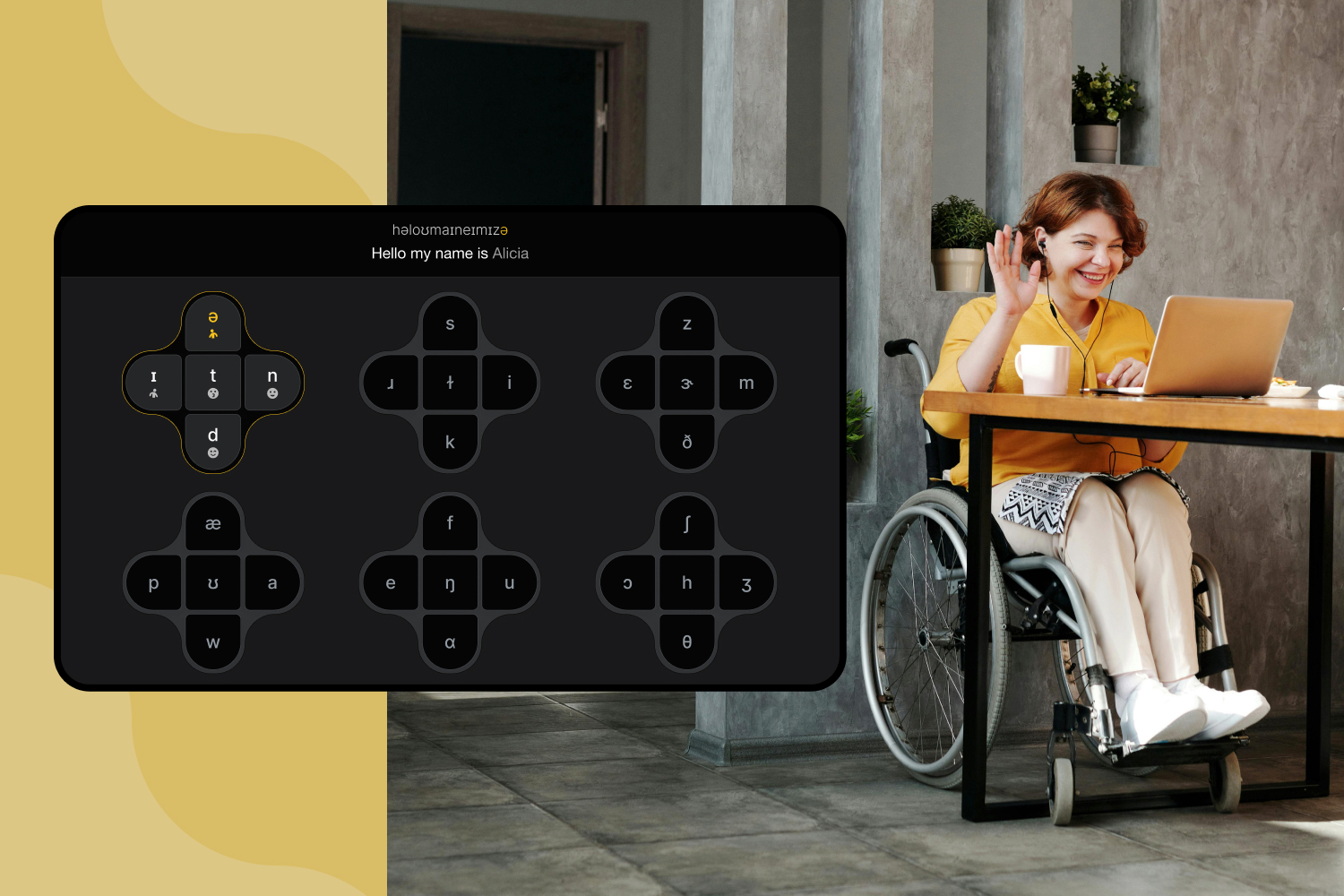
Imagine a spelling keyboard, but rather than using letters to spell we’re using sounds. More specifically: we’re using phonetic symbols to form speech.

Sketch of a “phonetic keyboard” optimized for gaze and gesture.
Nearly every sound in human speech has been mapped out as part of the International Phonetic Alphabet (IPA). This system encompasses all languages and includes over 170 unique phonetic symbols. But not all languages use all of the sounds. For example, the English language utilizes only about 35 unique symbols at varying frequency.

The IPA is useful because it is a robust system for mapping unique sounds to discrete symbols – making it perfect for software. Equipped with this framework, we can craft a smart language system that maps discrete human movements into English text and/ or an AI-generated voice:
- Discrete movement ⤏ IPA symbols – Use a gaze‑ and gesture‑based interface (or any other input modality) to select IPA characters on‑screen.
- IPA symbols ⤏ Embeddings – Convert the chosen IPA sequence into learned vector embeddings (similar to token embeddings in LLMs).
- Embeddings ⤏ Text – Feed the IPA embeddings into a custom sequence‑to‑sequence model that predicts the corresponding text tokens in a given language.
- Text ⤏ Voice (optional) – Pass the generated text to a neural TTS engine (such as a modern AI voice synthesizer) to produce spoken output.
This framework is highly flexible. There are likely many dozens of unique language systems that could be supported – ranging from quite rudimentary and minimalist to highly sophisticated and customizable. Here’s an example of simple version that can be controlled with gaze and gestures.
Animated sketch of a phonetic keyboard accessed via gaze and a single discrete selection method, like a gesture or switch activation.
As the user selects different phonetic symbols, the underlying model displays its best-guess English prediction corresponding to the sounds. There is no need to manually type spaces, as these can be inferred by the sequence of sounds. In the cases where the prediction is incorrect, the user can cycle over alternate predictions using the arrow keys to the right of the main text area. Once the user has completed entering their sequence of sounds, they can select the “Speak” button to trigger actual speech audio.
Note that this system is equivalent to mapping head-eye-gesture combinations to individual sounds. Theoretically, the user will develop muscle memory with sufficient practice.
Sidenote: Speed of Access
A quick analysis using existing data shows that there are approximately 4.5 IPA symbols per English word on average (English words contain about 5 Latin characters on average). I also performed a quick test to guesstimate what input speed we might hope for from a device user. Pending more rigorous study, we might hope for 1.4 symbols per second or more from an advanced user with a reasonable degree of motor control and coordination. This leads to roughly 18.7 words per minute. By comparison, average texting speed on a smartphone keyboard for a non-handicapped person is about 32 words per minute.

North Star
Our future vision is to create a tablet‑based AAC platform that turns everyday head, eye, and facial gestures into a fluid, AI‑generated voice — much like learning to play an instrument. By leveraging inexpensive webcams and state‑of‑the‑art computer‑vision models, we can deliver a system that works out‑of‑the‑box for users with moderate motor control, while still offering a path toward custom hardware for those who need finer‑grained movement detection. The core experience centers on muscle‑memory: once users master a small set of intuitive gestures, they can produce speech without constantly watching the screen, freeing cognitive resources for conversation rather than navigation.
To maximize impact, the platform will combine a phonetic keyboard with adaptive AI that learns each user’s gesture patterns, predicts intended words, and refines voice synthesis in real time. Therapists will benefit from built‑in analytics that track progress, suggest personalized adjustments, and allow fine‑tuning of voice pitch, tone, and speed. By supporting multiple languages, haptic feedback, and future wearable integrations, the system remains versatile enough to grow with emerging technologies while staying grounded in a simple, affordable tablet‑and‑webcam setup that can be deployed today.
There are tons of exciting possibilities ahead, but the project is currently on the back‑burner pending additional funding. If you’re interested in collaborating, providing expertise, or investing in the next generation of webcam‑driven AAC technology, please get in touch through our contact form or email us directly at hello@humaticlabs.com. We look forward to exploring partnerships that bring this vision to life.
Get in Touch
Have a question or want to discuss your next project? Send a quick message. Let's start building something great together.